
Run my business
Software that runs your business, built locally
CRMs, staff apps, dashboards and automation — the systems that take the admin off your plate. We'll set up the right tool for you, or build something custom. Start small, built to last.
What we build
Eight ways this usually takes shape
Most projects are a combination of two or three of these rather than one neat category. Start anywhere — we'll work out the rest with you.
- Custom software Applications built around how your organisation operates.
- CRM & business systems Customers, leads, jobs, quotes and documents in one place instead of six.
- Business automation Remove the repetitive steps and connect the tools you already pay for.
- AI solutions AI inside your existing workflows — and a straight answer when you don't need it.
- Dashboards & analytics Turn the information you already collect into something you can decide from.
- Websites & digital Sites that do more than exist — built to work for the business behind them.
- Cloud & Microsoft 365 Set up securely, kept organised, and understood by the people using it.
- Technology partnership Ongoing development and advice, without building a technology department.
Two ways forward
Set up the right tool, or build custom
We're not precious about it — whatever suits your business and budget. Curious about AI for your business? We can help there too, minus the hype.
Already paying for software that doesn't fit? See whether to improve, connect or replace it.
-
Set up the right tool
Often the smartest move is configuring a proven platform to match how your business works.
- CRM (contacts, jobs, follow-ups)
- Job management & quoting
- Microsoft 365 / cloud
- Shared docs & workflows
-
Build something custom
When off-the-shelf doesn't fit, we build a focused tool around your exact process.
- Staff apps & client portals
- Custom databases
- Dashboards & Power BI reporting
- Automations that save admin
Not sure yet?
Two quick tools to help you work it out
-
Not sure how your IT stacks up?
Answer a few quick questions and get a clear read on where things stand.
Take the Business IT Assessment -
Wondering what managed support would look like?
A quick calculator to see roughly what level of ongoing support fits your business.
Try the Managed IT Calculator
If it doesn't exist yet
You've got the idea. We'll help build it.
You don't need to write a technical specification, know what a database is, or have any of it worked out. If you can explain the problem and how things work today, that's enough to start.
- 01
Tell us the problem
What you want to achieve, who it's for, and what you wish worked better. No technical brief needed.
- 02
We work out the shape
Requirements, screens, and what the first useful version needs to contain.
- 03
We build the first version
A working thing you can use, not a document describing one.
- 04
It grows from there
Real use tells you what matters next — far better than guessing up front.
How a build works
Clear stages, no black box
- 1
Discovery
A paid, low-cost scoping step to map what you need and what it'll take. No big commitment up front.
- 2
Build
Built in clear stages so you can see progress — not a black box that disappears for months.
- 3
Launch & support
We roll it out and train your team. Ongoing support is optional and recommended, on a scope agreed up front.
-
Ownership agreed up front
What you'll own, what's licensed and what's handed over are set out in writing before the build. Your business data is always yours.
-
Start small
We begin with one manageable step and grow from there — lower risk for both of us.
-
Support if you want it
Optional ongoing support keeps it reliable as you grow. Hosting and support charges are agreed before work begins.
What's involved
The building blocks
Recent build
A real platform we built
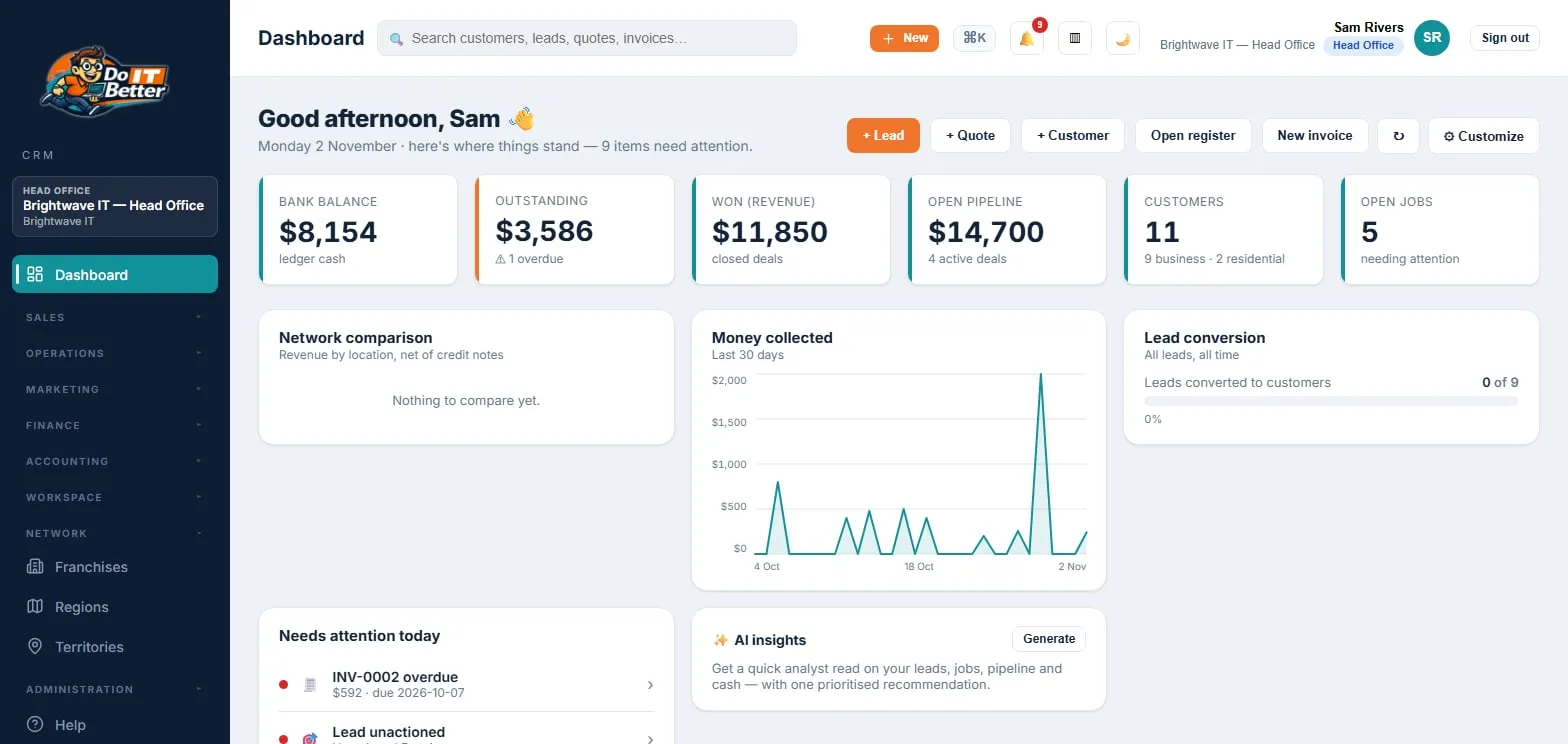
We built a complete franchise business system — CRM, POS, invoicing, jobs, inventory and franchise management — to run our own business. It's working proof of what we can build for yours.
Questions
Common questions
How much does a custom system cost?
Starting prices are on the pricing page — a database or internal tool from $8,500, a custom business system from $25,000. Where yours lands depends on what it needs to do, and that is what the discovery step is for: it is paid, it is small, and it gives you a realistic range before you commit to anything.
Do I need to know exactly what I want first?
No, and most people don't. You need to be able to describe the problem and how the work happens now. Turning that into requirements is our job, not yours.
What if an off-the-shelf tool would do the job?
Then we'll tell you, and help you set it up instead. Configuring a proven platform is often the smarter and cheaper move, and it's half of what we do here.
How long does a build take?
A small automation can be days. A system that replaces a real chunk of how a business runs is usually months, built in stages so you see something working early rather than waiting for one big reveal.
Who owns the code and the data?
It's agreed in writing for each project before the build starts: whether the code written for you transfers and when, which reusable components are licensed rather than transferred, whether you receive the source code, and whose name the accounts are in. Your business data is yours. Third-party parts (open-source components and paid services like hosting, payments or Microsoft 365) stay under their own licence terms. More on the software replacement page.
What happens after it's built?
Ongoing support is optional, and recommended, because software that nobody maintains slowly stops working. It can be light-touch or a full technology partnership, and its scope and charge are agreed before work begins. Without it, keeping the system up to date is yours to arrange.
Free business review
Not sure what you need yet?
That's normal. Book a quick chat and we'll work out whether a tool, a tweak, or a custom build is the right call.
